I’ve been playing with OpenClaw, an open-source AI agent platform, and I really liked how easy it was to spin it up with Docker Compose. But I wanted more — I wanted it to run on Kubernetes, managed declaratively, with a single YAML file. So I built my own operator.
Why Build an Operator?
Could I just write a bunch of Kubernetes manifests and call it a day? Sure. But where’s the fun in that?
An operator watches a Custom Resource and reconciles the actual state of the cluster to match the desired state. If something drifts, it fixes it. If you change the config, it rolls out the update. It’s the Kubernetes-native way to manage stateful applications — and it’s a great study project if you want to really understand how controllers work under the hood.
What the Operator Does
You write one YAML — an OpenClawInstance — and the operator takes care of everything:
- ConfigMap with your
openclaw.json(with smart merge so agents don’t lose runtime changes) - PersistentVolumeClaims for data and Ollama models
- Ollama deployed as a separate StatefulSet with its own storage
- Gateway StatefulSet with init containers that install tools via
apt-get - CLI sidecar for interactive TUI access
- Services to expose everything inside the cluster
One CR in, full stack out.
Installing the Operator
There are a few ways. Pick your favourite.
Raw manifest:
kubectl apply -f https://raw.githubusercontent.com/alessandrolomanto/openclaw-operator/main/dist/install.yaml
Once the operator is running, you’ll see it in the openclaw-operator-system namespace:
kubectl get pods -n openclaw-operator-system
Deploying an OpenClaw Instance
First, create a secret with your API keys:
kubectl create secret generic openclaw-api-keys \
  --from-literal=ANTHROPIC_API_KEY=sk-your-key
Then apply your instance:
apiVersion: openclaw.nonnoalex.dev/v1alpha1
kind: OpenClawInstance
metadata:
  name: my-agent
spec:
  image:
    repository: ghcr.io/openclaw/openclaw
    tag: latest

  config:
    mergeMode: merge
    raw:
      gateway:
        port: 18789
        mode: local
        bind: lan

  envFrom:
    - secretRef:
        name: openclaw-api-keys

  tools:
    - jq
    - curl

  storage:
    size: 20Gi

  ollama:
    enabled: true
    storage:
      size: 50Gi

  cli:
    enabled: true
After a minute or so:
kubectl get openclawinstance
# NAME       PHASE     READY   GATEWAY                        AGE
# my-agent   Running   True    my-agent.default.svc:18789     2m
The operator created everything — ConfigMap, PVCs, Ollama StatefulSet with its Service, the Gateway StatefulSet with init containers, and the CLI sidecar. All managed, all reconciled.
Accessing the CLI and onboard
The CLI sidecar sits inside the gateway pod, sharing the same network and volumes. You can attach to it:
kubectl exec -it my-agent-0 -c cli -- openclaw onboard
From here you get the full OpenClaw TUI — create agents, chat, manage workspaces. The tools you specified in the CR (jq, curl) are available too, installed at boot by the init container. Are important because you can create custom skill for your agent and in the official docker image you don’t find it and you can’t install it without a custom Dockerfile.
Interacting with Ollama
Ollama runs as a separate StatefulSet with its own PVC for model persistence. The gateway is already configured to talk to it at http://my-agent-ollama:11434 — no extra config needed. You have two options for using models.
Using cloud models
If you don’t have a beefy GPU but still want to use Ollama as a provider, you can use cloud-hosted models. First, sign in to your Ollama account:
kubectl exec -it my-agent-ollama-0 -- ollama signin
Then pull a cloud model:
kubectl exec -it my-agent-ollama-0 -- ollama pull minimax-m2.7:cloud
Cloud models run remotely — your Ollama pod just acts as a proxy, so no GPU or extra memory is required on your cluster.
Using local models
If your nodes have enough resources (or a GPU), you can run models locally:
kubectl exec -it my-agent-ollama-0 -- ollama pull llama3.2
The model gets stored on the PVC, so it survives pod restarts. Keep in mind that local models need enough memory on the node — the ollama.resources section in the CR is where you set those limits.
Using the Dashboard
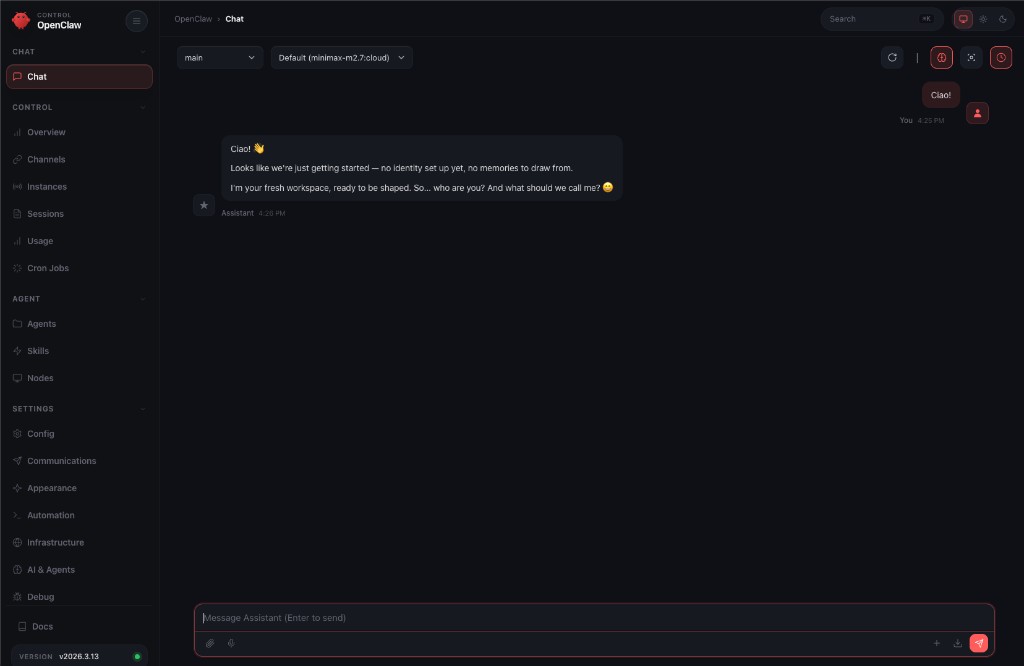
OpenClaw comes with a web dashboard for managing agents visually. To access it from your local machine, port-forward the gateway service:
kubectl port-forward svc/my-agent 18789:18789
Then grab the authentication token from the CLI sidecar:
kubectl exec -it my-agent-0 -c cli -- openclaw dashboard
This prints a URL with the token — something like http://localhost:18789/dashboard?token=.... Open it in your browser and you’re in. From the dashboard you can create agents, configure models, manage workspaces, and monitor running sessions — all without touching the terminal.
Interacting with Ollama (you can skip this step if you want to use directly your onboarded model)
Ollama runs as a separate StatefulSet with its own PVC for model persistence. You can pull models directly:
kubectl exec -it my-agent-ollama-0 -- ollama pull llama3.2
The model gets stored on the PVC, so it survives pod restarts. The gateway is already configured to talk to Ollama at http://my-agent-ollama:11434 — no extra config needed.
The full source is on GitHub: alessandrolomanto/openclaw-operator
If you’re thinking about building your own operator, just start. Pick something you use, read the Kubebuilder book, and scaffold your first CRD. The best way to learn Kubernetes internals is to extend it.